
Using ChatGPT meeting notes workflows can turn messy discussions into organized action items, but unverified summaries often invent tasks, owners, and deadlines. But there is a problem that office workers should watch for: AI-generated meeting summaries can include tasks, owners, or deadlines that were never explicitly agreed upon.
Imagine leaving a meeting where your team discussed reviewing a project proposal. Later, an AI-generated summary says that someone must submit the final proposal by Friday—even though nobody made that commitment.
A small difference in wording can turn an open discussion into an apparent obligation.
The solution is not simply to ask ChatGPT for a better summary. You need a process that separates confirmed meeting decisions from suggestions and missing information.
In this guide, you’ll learn how to:
- Identify unsupported action items in AI-generated meeting notes.
- Use a ChatGPT prompt that discourages invented responsibilities and deadlines.
- Organize confirmed tasks into a practical action-item table.
- Mark unclear information for human review.
- Check the result against the original notes before sharing it.
The examples below use fictional meeting notes created for illustration. They are not results of a controlled accuracy benchmark.
Why ChatGPT Meeting Notes Can Invent Action Items
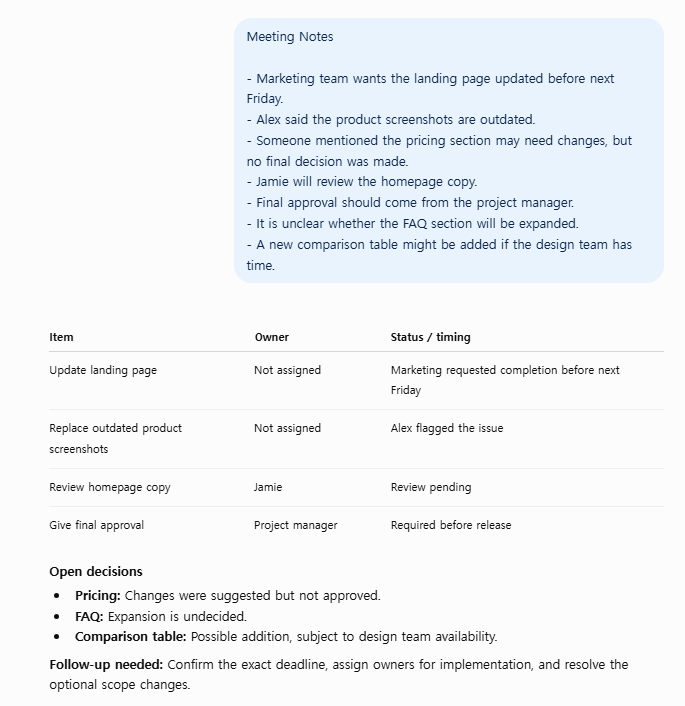
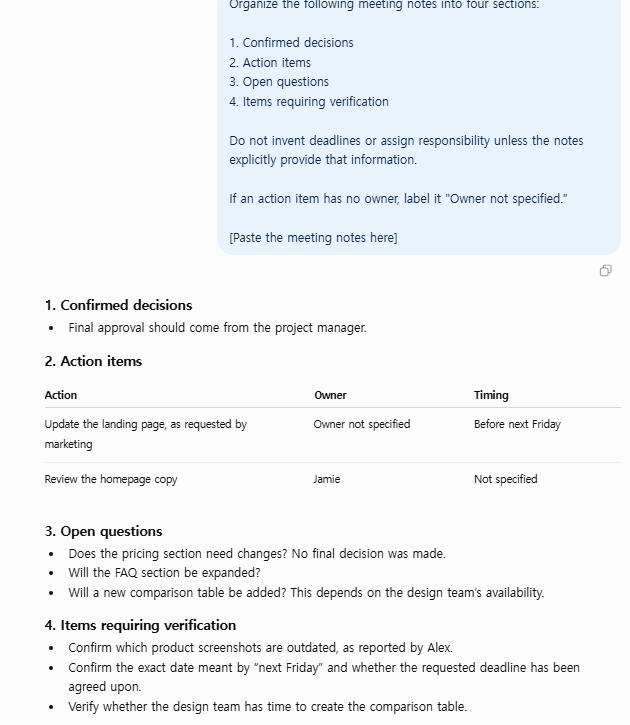
The screenshots below show an exercise using ChatGPT meeting notes for a website project. They are provided as illustrative examples and are not a controlled accuracy comparison.
Example: Comparing Two ChatGPT Meeting-Notes Outputs
The first screenshot shows a fictional meeting-notes example and an AI-generated action-item table. Some items are expressed as tasks even though the original notes describe them as issues to review or possible next steps.
The second screenshot shows a more structured prompt that asks ChatGPT to separate confirmed decisions, action items, open questions, and information requiring verification.
The comparison illustrates why source checking and clear instructions matter. These screenshots do not establish a measured improvement in accuracy, and the two outputs should not be treated as a controlled experiment.
ChatGPT generates responses based on the information and instructions it receives. When meeting notes are incomplete or ambiguous, its output may contain assumptions that sound reasonable but are not supported by the original conversation.
OpenAI explains that ChatGPT can produce incorrect or misleading information, sometimes with unwarranted confidence.
This matters when an AI-generated meeting summary is treated as an official record.
Consider three common problems that emerge when relying on unverified ChatGPT meeting notes without guardrails.
1. Turning a Discussion Into an Assignment
Original note:
“The team discussed updating the client onboarding checklist.”
Unsupported action item:
“Sarah will complete the onboarding checklist update.”
The original note does not identify Sarah as the owner or confirm that the update was assigned.
A more accurate summary would be:
“Potential follow-up: Review the client onboarding checklist. Owner: Not stated.”
2. Inventing Deadlines
Original note:
“We should revisit the proposal next week.”
Unsupported action item:
“Submit the final proposal by Monday.”
“Next week” does not establish a specific deadline. It also does not necessarily mean that a final proposal must be submitted.
A safer entry is:
“Proposal review discussed for next week. Exact date: Not stated.”
3. Treating Suggestions as Decisions
Original note:
“Alex suggested testing a new reporting dashboard.”
Unsupported action item:
“Launch the new reporting dashboard.”
A suggestion is not the same as an approved task. The meeting summary should preserve that distinction.
Example: Meeting Notes With Missing Details
Let’s use the following fictional meeting notes.
Sample meeting: Weekly Operations Review
Attendees: Alex, Sarah, and Jordan
Meeting notes:
- Alex confirmed that the monthly performance report needs a formatting update.
- Sarah agreed to review the report before Friday.
- The team discussed whether to redesign the client onboarding checklist.
- Jordan suggested testing a new dashboard next month.
- The group decided to schedule another meeting to discuss customer feedback.
- No person was assigned to schedule the next meeting.
This example deliberately contains a mixture of confirmed responsibilities, general decisions, and suggestions.
An accurate action-item extraction should not treat them all as equally confirmed tasks.
What a Reliable Action-Item Table Should Look Like
Based strictly on the fictional notes, a careful extraction could look like this:
| Item | Owner | Deadline | Status |
|---|---|---|---|
| Update monthly report formatting | Not stated | Not stated | Task identified; assignment unconfirmed |
| Review the monthly report | Sarah | Before Friday | Confirmed commitment |
| Redesign onboarding checklist | Not stated | Not stated | Discussion only |
| Test a new dashboard | Not stated | Not stated | Suggestion only |
| Schedule customer feedback meeting | Not stated | Not stated | Follow-up needed; owner unassigned |
Notice that the table does not invent a person to update the report, assign Jordan to test the dashboard, or turn the checklist discussion into an approved project.
For maximum accuracy, tasks marked “discussion only” or “suggestion only” should remain separate from confirmed action items.
The phrase “before Friday” is retained exactly as written. Without a meeting date and additional context, it should not automatically be converted into a calendar date.
Maintaining this strict factual boundary keeps your ChatGPT meeting notes reliable across recurring team syncs.
A ChatGPT Prompt to Reduce Invented Action Items
You can copy the following prompt to standardize your ChatGPT meeting notes extraction process.
Copy-and-paste prompt:
You are a meeting-notes extraction assistant.

Your task is to identify decisions, confirmed
action items, suggestions, and unresolved questions.

Use ONLY information explicitly supported
by the meeting notes.

Rules:
1. Do not invent tasks, owners, deadlines,
   approvals, or decisions.
2. Do not turn a suggestion into a confirmed task.
3. If an owner is missing, write "Not stated."
4. If a deadline is missing, write "Not stated."
5. Preserve relative dates exactly as written.
6. Separate confirmed action items from
   suggestions and discussion topics.
7. For every confirmed action item, include
   a short supporting quote from the notes.
8. If the notes do not support a claim,
   mark it "Needs confirmation."
9. Do not silently resolve contradictory
   or ambiguous information.
10. Do not claim that the output is verified
    unless it has been checked by a person.

Return these sections:

A. Confirmed Action Items
Columns: Task | Owner | Deadline | Source Quote

B. Suggestions and Discussion Topics
Columns: Topic | Proposed Next Step | Status

C. Missing Information
List unclear owners, dates, or decisions.

D. Verification Checklist
List the details a human should confirm.

MEETING NOTES:
[PASTE NOTES HERE]
The most important parts of this prompt are the explicit restrictions on guessing and the requirement to provide supporting evidence.
Important: A stricter prompt can help constrain the output, but it does not guarantee that ChatGPT will never make a mistake.
How to Verify the Output Before Sharing It
Even with guardrail prompts, auditing ChatGPT meeting notes against the original discussion is necessary.
Step 1: Check Every Assigned Owner
Look at each person named in the action-item table.
Ask:
“Did this person explicitly accept responsibility, or did the AI infer that they were responsible?”
If the notes do not establish ownership, change the owner field to “Not stated” and ask the team to confirm it.
Step 2: Check Every Deadline
Compare each deadline with the original meeting notes.
Do not automatically convert phrases such as “soon,” “next week,” or “before the next review” into specific dates.
A deadline should be treated as confirmed only when the supporting context establishes it.
Step 3: Separate Decisions From Ideas
A meeting may include dozens of suggestions but only a few approved actions.
Keep these categories separate:
- Confirmed action items
- Decisions
- Suggestions
- Unresolved questions
This prevents the team from mistaking brainstorming for agreed work.
Step 4: Look for Missing Tasks
AI-generated summaries can also omit relevant information.
Review the original notes and check whether each confirmed assignment appears in the output.
Accuracy involves avoiding invented items and avoiding omissions.
Step 5: Confirm the Final List With the Team
Before sending the summary as an official meeting record, ask the meeting owner or relevant participants to verify unclear details.
This is especially important for customer commitments, financial decisions, legal matters, and project deadlines.
Use a Simple Verification Checklist
Before approving a ChatGPT-generated action-item list, answer these five questions:
- Is every confirmed task supported by the original notes?
- Is each named owner explicitly supported by the notes?
- Is every deadline stated or clearly established?
- Are suggestions separated from approved actions?
- Have missing details been flagged rather than guessed?
If any answer is “No,” revise the summary before sharing it.
How to Organize Verified Action Items in Google Sheets
Once your action items have been reviewed, you can move them into a spreadsheet for tracking.
A simple structure is:
| Task | Owner | Due Date | Status |
|---|---|---|---|
| Review monthly report | Sarah | Before Friday | In Progress |
| Update report formatting | Unassigned | Not stated | Needs Assignment |
| Schedule feedback meeting | Unassigned | Not stated | Needs Assignment |
For spreadsheet tracking, you may want an additional “Source Note” column to preserve the evidence behind each task.
Linking verified items directly to a spreadsheet transforms raw ChatGPT meeting notes into a reliable operational log.
When task statuses are standardized, Google Sheets can count completed tasks automatically.
See our guide: How to Count Completed Tasks in Google Sheets Using COUNTIF.
You can also read our broader article, The Practical Guide to AI Productivity for Office Workers, for more ideas on using AI to support everyday work.
Can ChatGPT Guarantee Accurate Meeting Notes?
No.
ChatGPT can assist with extracting, formatting, and organizing meeting information, but the final result can still contain inaccuracies or missing details.
OpenAI’s own guidance recommends checking important information instead of assuming every AI-generated answer is correct.
For important meetings, the original notes or transcript should remain the reference source.
Also, avoid pasting confidential workplace conversations or personal information into an AI service unless your organization’s policies and the service’s data handling terms permit it.
Frequently Asked Questions
Why does ChatGPT add tasks that were never discussed?
When processing ChatGPT meeting notes, language models often infer plausible next steps from casual conversation.
How do I stop ChatGPT from making up deadlines?
When extracting deadlines from ChatGPT meeting notes, tell the model to use only dates explicitly supported by the discussion.. Require “Not stated” for missing dates and ask it to preserve ambiguous relative dates without converting them into specific calendar dates.
Can ChatGPT identify who owns each action item?
It can extract owners when the notes clearly identify them. If ownership is unclear, the output should flag the missing information instead of assigning a person.
Should I use ChatGPT meeting summaries without reviewing them?
No. Review the summary against the original notes, especially when it involves commitments, deadlines, approvals, or sensitive information.
What is the best format for meeting action items?
A table containing the task, owner, due date, status, and supporting source text is a practical starting point. Separate suggestions and unresolved questions from confirmed commitments.
Final Thoughts
Relying on ChatGPT meeting notes can save substantial administrative time, but a professional workflow requires strict verification.
The safest practical approach is to extract what the meeting actually established, label what remains uncertain, and verify important details before assigning work.
Start with the prompt above, test it on non-sensitive meeting notes, and compare every action item with the source.
The objective is not to make AI-generated summaries look complete. It is to make them useful without hiding uncertainty.
Sources and further reading
📌 Quick Summary: How to Keep AI Notes Accurate
- Use Guardrail Prompts: Require “Not stated” for missing owners or deadlines instead of letting ChatGPT guess.
- Preserve Unverified Context: Separate confirmed decisions from brainstorming ideas and tentative proposals.
- Human-in-the-Loop Review: Always cross-reference high-stakes action items against original notes before team distribution.
🔗 Recommended Productivity Workflows
Take your automated office workflows one step further with our step-by-step guides:
- Automate Task Tracking: How to Count Completed Tasks in Google Sheets Using COUNTIF — Calculate completion rates and track verified action items automatically.
- Complete AI Strategy: A Practical Guide to AI Productivity for Office Workers (2026) — Best practices for combining LLMs with spreadsheets while maintaining data privacy.
💬 How does your team verify AI summaries?
Have you ever caught an AI assistant making up an assignment or deadline? Share your experience in the comments below, or copy the prompt above to test on your next team sync!
Editorial note: The meeting notes and tables in this article are fictional teaching examples. They illustrate a verification method, not a measured test of ChatGPT accuracy or a claim that a particular prompt guarantees error-free output.